You’ve asked ChatGPT or Perplexity about your own niche. Your competitors show up. You don’t. Your content is good — arguably better. So what’s actually going on?
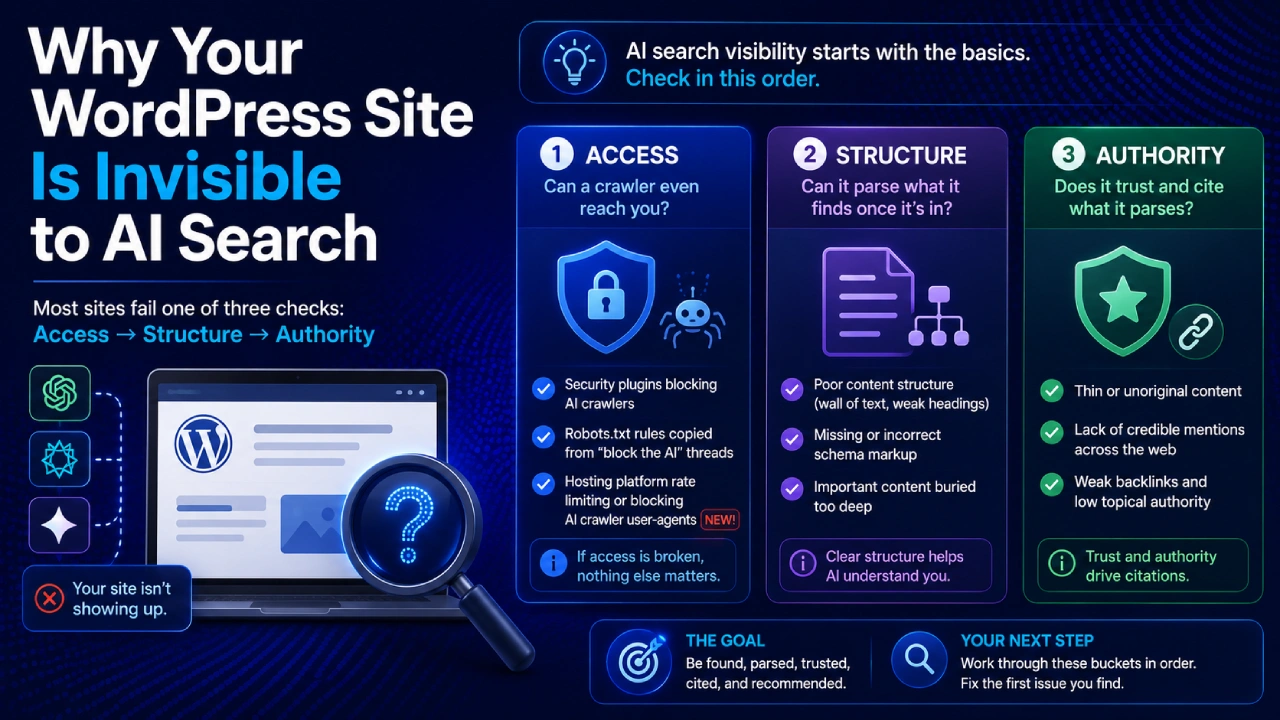
Most WordPress sites go unnoticed by AI search for one of three reasons, and they need to be checked in this order: Access (can an AI crawler even reach your content), Structure (can it parse what it finds once it’s in), and Authority (does it trust and cite what it parses). Almost everyone jumps straight to Authority — “I need better content” — without ever confirming the first two. If Access is broken, nothing else in this list matters at all.
This article walks through all three, in the order you should actually check them, including one access-layer culprit that’s invisible to your own site dashboard and that almost nobody checks.
Quick Gut-Check: Do You Actually Want This?
Before diagnosing anything, it’s worth being honest about one thing: blocking AI crawlers entirely is a legitimate choice for some sites, not a mistake.
If your business runs on ad impressions or affiliate clicks and your value is entirely in getting a human to land on your page, an AI system summarizing your content without sending a visitor back can be a real net loss, not just an unmeasured one. Plenty of experienced site owners have made a deliberate, informed decision to block AI crawlers for exactly this reason, and it’s a defensible one.
This article is written for the more common case for a WordPress content or service site: you want to be found, cited, and recommended, and something is quietly preventing that. If that’s you, keep reading.
Bucket 1: Access — Can a Crawler Even Reach You?
This is the layer almost nobody checks first, and it’s the one that makes everything else irrelevant if it’s broken. If a crawler can’t fetch your page, your content quality, your schema markup, and your writing style are all completely beside the point.
Security plugins with default bot blocklists
Popular WordPress security and firewall plugins often ship with built-in blocklists targeting known bot user-agents, and depending on version and configuration, AI crawlers can get caught in nets meant for malicious scrapers. This is worth checking directly rather than assuming — plugin defaults change across versions, and a rule that made sense two years ago may now be blocking exactly the traffic you want.
Robots.txt rules copied from “block the AI” threads
There’s a genuinely large and active conversation happening across WordPress communities right now about whether to block AI crawlers on principle — frustration over server load with no referral traffic in return is real and well-documented. A common outcome of that conversation is site owners copy-pasting ready-made robots.txt disallow rules for GPTBot, ClaudeBot, and similar user-agents, sometimes without weighing whether visibility in AI answers is actually valuable for their specific site. If you don’t remember deliberately choosing to block AI crawlers, it’s worth checking your robots.txt file directly — it’s usually visible at yoursite.com/robots.txt — to confirm nothing was added on your behalf by a plugin or a past version of you that read a different blog post.
The one almost nobody checks: your hosting platform itself
This is the access-layer problem worth taking most seriously, because it’s structurally invisible.
A detailed investigation published in 2026 found that at least one major managed WordPress hosting provider applies AI-crawler rate limiting at the platform infrastructure level — a layer that sits between your site and the internet, below your WordPress security plugins and even below your own Cloudflare account if you have one. Requests from certain AI crawler user-agents were returned a “too many requests” response for a large share of traffic, while identical requests with a regular browser user-agent succeeded every time.
What made this genuinely hard to detect: the block didn’t appear in the site’s WordPress security plugin logs, didn’t appear in the site owner’s own Cloudflare dashboard, and wasn’t controllable through any customer-facing setting. It fired at a layer above all of those, and cached pages were still served normally to the same bots — so intermittent, inconsistent AI crawler access looked like a minor fluke rather than a systemic block.
The investigation compared several major managed WordPress hosts and found meaningfully different public stances: some hosts state plainly that they don’t block AI crawlers at the platform level by default and leave the decision to the site owner via robots.txt, while at least one enforces a non-self-service block that requires directly contacting support to even ask about an exception. This isn’t a universal WordPress hosting behavior — it’s host-specific, and it varies enough that it’s worth confirming which category your own host falls into.
A simplified way to check this yourself, even without technical background: most hosts let you test how your site responds to different visitor types using a basic command-line tool called curl. If you’re comfortable opening a terminal, running a request with an AI crawler’s user-agent string and comparing the response to the same request with an ordinary browser’s user-agent is the most direct way to confirm whether something is silently blocking access before content even becomes a factor. If that’s outside your comfort zone, the practical shortcut is simpler: contact your host’s support directly and ask whether they apply any platform-level rate limiting or blocking to AI crawler user-agents (GPTBot, ClaudeBot, PerplexityBot, Amazonbot), and whether it can be disabled or scoped for your site specifically. A host with nothing to hide here will give you a direct answer quickly.
Bucket 2: Structure — Can It Parse What It Finds?
If Access checks out, the next question is whether what the crawler retrieves is actually usable.
JavaScript-heavy page builders
This is one of the most common — and most invisible — structural problems on WordPress specifically. Popular visual page builders like Elementor, Divi, and WPBakery can render a meaningful portion of a page’s actual content client-side, meaning the content appears correctly in a human’s browser but isn’t present in the raw HTML a non-rendering crawler receives. Most AI crawlers, including the major ones, read raw HTML and don’t execute JavaScript the way a browser does — a detail covered in more depth in Day 3 of this series. A page can look complete and polished to you and still return as a largely empty shell to the systems you’re trying to reach.
The way to check: view your page’s source HTML directly (not through the browser’s rendered inspector, but the actual raw response) and confirm your key text content — not just placeholder divs — is actually present.
Thin, unstructured content
Covered in depth in Days 1 and 3 of this series, but worth restating briefly here as a structural checkpoint: content that never states a clear, self-contained answer, that relies on surrounding context to make sense, or that buries the actual point several paragraphs deep is harder for retrieval systems to extract cleanly — even when the underlying information is accurate and useful.
Missing or inconsistent author information
If your posts don’t have visible author bios, or if your site’s “about” information is inconsistent with how you’re described elsewhere online, that’s a structural gap in the credibility signals AI systems look for when deciding whether content is trustworthy enough to lean on.
No llms.txt or machine-readable discovery layer
A growing number of WordPress sites now publish a simple text file that gives AI systems a quick, structured overview of what the site covers — separate from what a human visitor sees. Not every AI platform uses this file today, and it’s not a substitute for the fundamentals above, but its absence is one more small structural gap. This deserves its own dedicated explanation, which is exactly what Day 6 of this series covers.
Bucket 3: Authority — Does It Trust What It Parses?
If a crawler can reach you and can cleanly parse your content, the last layer is whether the system has enough confidence in you to actually cite you over a competing source.
No third-party consensus
As covered in Day 3, AI systems weigh agreement across the sources they retrieve for a given question — if your recommendation or claim only ever appears on your own domain and nowhere else across the web, it carries less weight than the same claim echoed independently by a few other credible sources. A brand with zero outside mentions, reviews, or forum discussion is starting from a real disadvantage here, regardless of how well the on-site content is written.
Inconsistent entity information
If your business name, description, or category is described differently across your own site, your social profiles, and any directories or listings you’re part of, that inconsistency reads as uncertainty to a system trying to confirm who you are and what you do.
Thin topical authority or site history
A brand-new site with a handful of posts on scattered topics gives an AI system very little to build confidence from, compared to a site with a clear, consistent publishing history around a defined set of subjects. This one resolves with time and consistency more than with any single technical fix.
Which Major WordPress Hosts Block AI Crawlers by Default?
Based on published host documentation and one detailed independent investigation from 2026, here’s the general landscape — though it’s worth verifying current policy directly with your own host, since these positions can and do change.
| Host | General Stance on AI Crawler Access |
|---|---|
| Kinsta | States it does not block AI crawlers at the platform level; bot protection is opt-in and customer-controlled |
| Pressable | States it does not disallow AI crawlers by default; access is managed via the site’s own robots.txt |
| Pantheon | States it does not block identified bot traffic from entering the platform |
| WP Engine | Documented as applying platform-level AI crawler rate limiting that isn’t customer-disableable by default, per a 2026 independent investigation; an exception can reportedly be escalated through support |
| SiteGround | Documented as blocking AI training crawlers by default, with more transparency around the distinction between training bots and user-facing bots |
If you’re on a host not listed here, don’t assume either way — ask directly.
A caveat worth stating plainly: hosting policies like this change, and the investigation behind this table looked closely at one host’s setup rather than testing all of them with the same live methodology — some of this table rests on published documentation rather than independent verification. Treat it as a strong starting point for what to ask your own host, not a permanent, unchangeable fact about any of them. It’s also worth knowing that AI crawler user-agents can be spoofed — traffic claiming to be from a legitimate AI crawler doesn’t always originate from that company’s actual infrastructure, which is part of why some hosts and security tools are cautious by default. That’s a reasonable thing for infrastructure to guard against; the problem this article addresses is specifically when the guarding leaves no way for a site owner to say “actually, I want this traffic.”
Is WordPress Itself the Problem?
You may come across content arguing that WordPress as a platform is fundamentally unsuited to AI search, and that the real fix is switching to a different content system entirely. It’s worth addressing this directly, because the evidence doesn’t really support it.
Every issue covered in this article is a configuration, plugin, or hosting choice — not a limitation of WordPress as software. The access-layer blocking problem above is a hosting-platform decision, not a WordPress one, and it varies host to host even among WordPress hosts specifically. The structural JavaScript-rendering problem comes from specific page-builder plugins, not WordPress’s core rendering — a simply-themed WordPress site with minimal plugins can be just as crawler-friendly as any other content system, often more so, given how much tooling exists specifically for it.
Migrating platforms to solve what’s actually a hosting configuration or plugin choice is expensive and, based on everything covered above, unnecessary for the vast majority of sites.
Your 3-Bucket Action Checklist
Work through these in order — there’s little point auditing structure or authority if access is broken.
Access:
- Check your live robots.txt file for any AI crawler disallow rules you didn’t knowingly add
- Review your security plugin’s bot-blocking settings for AI crawler user-agents
- Contact your host directly and ask whether they apply platform-level rate limiting or blocking to AI crawlers, and whether it’s something you can control
Structure:
- View your key pages’ raw HTML source and confirm your actual content — not just empty containers — is present
- Check that your most important posts have visible, consistent author information
- Note whether you have an llms.txt file (more on this in Day 6)
Authority:
- Search for your brand name alongside your core topic and see whether anything outside your own site mentions you
- Confirm your business description is worded consistently across your site, social profiles, and any directory listings
- Take stock of your publishing history — is it consistent and topically focused, or scattered?
Frequently Asked Questions
Why doesn’t ChatGPT know about my business at all? This usually comes down to either an access problem (crawlers can’t reach your content) or an authority problem (nothing outside your own site confirms who you are). Training-data familiarity also takes time to build and isn’t something a single fix changes quickly — consistent presence over months, not days, is what shifts this layer.
Is my WordPress site blocking AI bots without me knowing? It’s possible in three separate ways: a security plugin’s default blocklist, a robots.txt rule added at some point (by you, a plugin, or a developer), or — the one most people never check — your hosting provider applying a platform-level block that doesn’t show up in any of your own dashboards. All three are worth checking directly rather than assumed.
Do I need special plugins for AI to see my site? Not necessarily. A well-configured WordPress site with a lightweight theme, no rogue crawler blocks, and clearly structured content can be fully accessible without any AI-specific plugin. Dedicated tooling can help with structured data and machine-readable files, but it’s solving Bucket 2 problems — it can’t fix a Bucket 1 access block, and it can’t manufacture Bucket 3 authority on its own.
Why does my competitor show up in AI answers and I don’t, even though my content is better? This is almost always Access or Authority, not content quality. Check whether your site is fully crawlable first, then check whether your competitor has more third-party mentions, reviews, or consistent presence across the web — consensus across sources matters more than most people expect.
Should I just block AI crawlers instead of fixing all this? For some business models — particularly ad- or affiliate-revenue content sites — that’s a legitimate, defensible choice. For a business or service site where being recommended has real value even without a click, it’s worth fixing the access layer before deciding either way, since right now you may not have a real choice being made at all — just an accidental block.
Where to Go From Here
This article covered the full diagnostic. The next steps in this series go deeper on specific pieces:
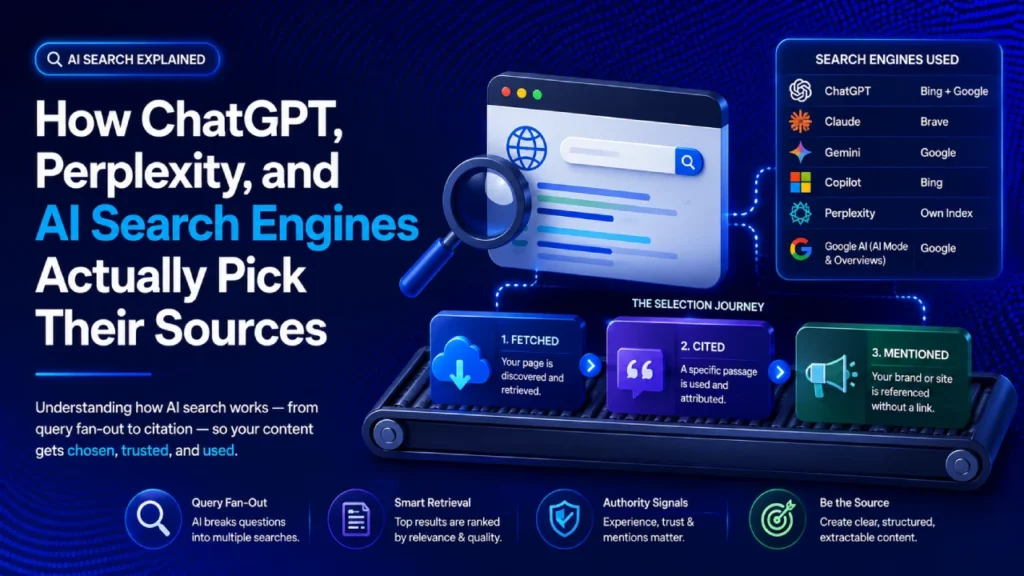
- How ChatGPT, Perplexity, and AI Search Engines Actually Pick Their Sources — the crawler and citation mechanics referenced throughout the Structure and Authority sections above
- The AI Visibility Score — turning this checklist into something you can actually measure and track over time
- llms.txt Explained — the machine-readable discovery layer touched on briefly here
- AI Crawlers Guide: GPTBot, ClaudeBot, and robots.txt — a full technical walkthrough of crawler-specific access control, including the curl-based self-check introduced above
Access is the floor. Structure and authority are what you build on top of it — but none of it matters until you’ve confirmed the floor is actually there.